FIXEdge® is an application server providing FIX connectivity to buy and sell side institutions, exchanges and clearing houses.
It supports all workflows for all asset classes defined in the FIX protocol including typical use cases such as:
- Capturing messages from clients. Serves as an Order Entry Gateway/router
- Entering orders/quotes to markets. Can be combined with check for pre-trade risk
- Capturing messages from a venue and saving them to a DB/message queue/plain text file. Serves as a FIX aggregator
- Fanning-out quotes/market data publishing. One FIX message can be distributed to many sessions (1-to-Many)
- Generic FIX message routing. Smart message router with configurable rules and message normalization/enrichment
Client applications communicate with FIXEdge via one of multiple supported message protocols (e.g. JMS, IBM MQ,REST) employing transport adaptors. It is designed to be easy to install, configure, administer and monitor sessions and trading information flows. It is written in C++ and has a performance profile suitable for the needs of all clients up to and including large sell-side institutions and large volume traders. FIXEdge adheres to the best information security practices defined in FIX security recommendations.
It can be deployed on an individual node or multiple nodes of a load balanced cluster, on premises or in the cloud. We offer a 30-day free trial with full support.
FIXEdge comes with a rich UI for monitoring session statuses and parameters in real time.
All libraries/servers are pre-configured for and certified with multiple exchanges. Software escrow is available on demand.
Features
| Feature | Description |
|---|---|
| High throughput / low latency |
FIXEdge leverages FIX Antenna C++ Engine's performance. The engine has been benchmarked on this hardware with the following results:
|
| Supports standard FIX |
FIXEdge uses FIX Antenna C++ on a FIX layer and thus inherits all FIX Antenna's functionality.
|
| Session management |
|
| Smart resend request processing logic |
|
| Delivery modes |
|
| Highly customizable FIX session level |
|
| Security |
|
| Reliability |
|
| Performance tuning |
|
| Message routing and transformation |
|
| Monitoring and administration |
|
| High availability | |
| Packaging |
FIXEdge is supplied as an installation package. The package includes:
FIXEdge package is available as a docker container. |
| Hosting options | Can be deployed on-premises or in the cloud. |
Platforms
| Operating System |
Support for other platforms is available on demand. |
 sales@b2bits.com
Transports
Additional non-FIX transports are available via pluggable transport adaptors.
| Transport Adaptor | Description |
|---|---|
| Camel |
Clients can leverage other Camel components from the component list to align with their ecosystem and business requirements. Configuration examples for Camel TA can be found in the /etc/fixedge/camel-ta-distribution directory of the FIXEdge C++ standard installation. |
| Kafka |
The Kafka TA is intended to communicate FIX messages to other applications using the Kafka streaming platform as middleware. |
| IBM MQ |
IBM MQ Transport Adaptor is an add-in for FIXEdge that allows clients to communicate with FIXEdge over IBM MQSeries middleware. |
| TIBCO RV |
Tibco RV Transport Adaptor is intended for communication between FIXEdge and third-party applications using Tibco Rendezvous protocol. |
| JMS |
JMS Adaptor for FIXEdge is intended for communication with FIXEdge from third-party applications via JMS. The JMS Adaptor is a library that exposes a set of methods for communicating with FIXEdge's Transport Layer. Can be connected to TIBCO EMS, Apache ActiveMQ |
| RabbitMQ |
RabbitMQ Transport Adaptor is intended for communication between FIXEdge and third-party applications using RabbitMQ as a middleware. |
| REST |
REST Acceptor Transport Adaptor is a module in FIXEdge working as a REST server that handles http(s) REST POST requests, extracts data and converts it to FIX format. The message body of incoming messages can be represented as a raw FIX message or JSON REST Initiator Transport Adaptor is a module in FIXEdge that sends FIX message from the Business Layer to a destination system as an http(s) REST POST request. The message body of outgoing messages can be represented as raw FIX message or JSON. |
| Java (Universal) |
FIXEdge in-built C++ Transport Adaptor that can be used for interaction between FIXEdge and any other Transport Adaptor written in Java. FIXEde provides an interface for integrating a user's Java code for message processing. |
| Custom C++ |
FIXEdge provides an SDK with an interface for integrating a user's С++ code, compiled to the shared library for message processing. |
| SMTP |
SMTP Transport Adaptor is intended to send FIX messages from the FIXServer to clients using the SMTP protocol (to email); FIX email message can be automatically converted to a standard email message |
| Solace |
Solace Transport Adaptor is intended for communication between FIXEdge and third-party applications using the Solace event broker as middleware. |
Transformation and Routing
- XML-based DSL for routing and transformation (FIXEdge Business Rules Guide)
- Set of rules joint by OR logical operator, i.e. each rule is executed separately and applied to the original message
- Rule conditions joint by AND logical operator
- Message modification
- Add, change, remove fields
- Convert between FIX versions
- Convert between FIX and FIXML
- Configurable Business logic with Javascript
- Configurable FIXML <-> FIX mapping with XSLT scripts
- Integration with Database over ODBC. Ability to store and get data to/from database
- Special routing strategies: "Deliver To" and "Order flow" strategies minimize number of rules to be written
- Event handling: control session creation, rules failure, non-routed messages, received an invalid message
- Send messages to multiple destinations
- Implement your own logic, compile and use it as a "plug-in" or "handler" in rules
- Inter-Process Communication (IPC) Handler to extend Business Layer functionality
It allows the expression of business rules in Python, Node JS, Java, or rules engines via inter-process communication channels.
High Availability
FIXEdge supports work in multiple node clusters with state replication, failover and recovery functionality. Historically FIXEdge clusters were based on the RedHat 8/9 pacemaker with corosync and are used in production in some of the most demanding environments in the world.
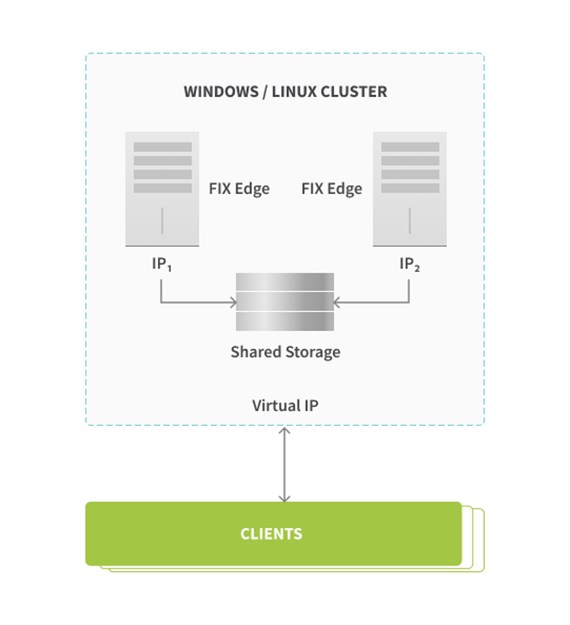
Nowadays EPAM offers Kubernetes-based FIXEdge cluster to be deployed on premise or in major clouds.
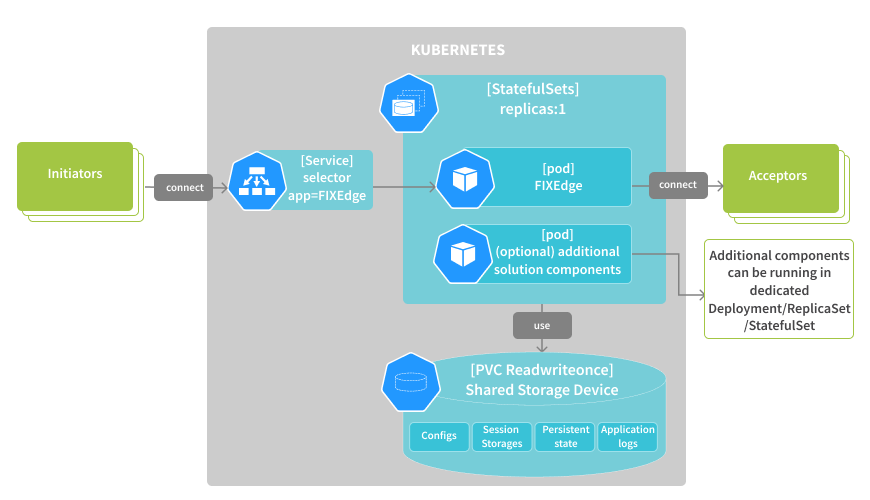
Major FIXEdge cluster features are:
- File-based or database-based persistence
- Automatic fast recovery state after failure
- Leveraging K8s features such as: persistent volume claims, config maps, secrets, services
- Supports two shared storages scenarios:
- Organizing shared storage utilizing third-party physical shared storage hardware or third-party shared storage software;
- Delivered in a form of Helm chart for easy installation
Disaster Recovery
FIXEdge is supplied with Logs Replication tool to organize continuous persistence synchronization across master node to one or more backup nodes in disaster recovery site.
Logs Replication tool that can be used not only for persistence synchronization but for organizing real-time backing up as well.
Security
FIXEdge follows the recommendations published by the FIX Trading Community to address all the current issues and challenges on the the cybersecurity front, to satisfy best practices and all the crucial requirements of the industry.
The following security features are supported in FIXEdge:
- Internal static code analysis against buffer overflows and other security breaches
- Protection from abnormal user behavior (including DDoS attacks)
- SSL/TLS with keys management for both initiator and acceptor roles
- Client certificate authentication
- Support for custom encryption algorithms
- FIX messages validation
- Filtering against IP range to be used for connection
- Settings for TCP protection
See FIXEdge Security Assurance for details.
Administration
FIXEdge configuration and administration are supported via the FIX Integration Control Center (FIXICC H2). FIXICC H2 enables the configuration, monitoring, and administration of FIXEdge. It works with FIXEdge using the REST API.
Major FIXICC H2 functions:
- Change server configuration
- Modify routing rules
- Reload routing rules (instruction to enact the latest changes if the latter are made while the server is running)
- Create and modify sessions schedules
- Export and import configuration
- View session logs
- View server and session metrics
Refer to FIXICC User Guide for details.